When contacting Support, they may ask you to submit a recent Player.log.
Player logs are often requested if you play Gems of War on PC and are helpful in checking for any errors in your account data.
If Support requests a player.log from you, follow the steps below to locate the file:
- Make sure GOW is completely closed
- Open your Main C: folder
- Locate the AppData folder. It's commonly in C: > Users > YOUR PC NAME > AppData
- This may be hidden. You can unhide it from your folders by right-clicking anywhere in your User folder and unselecting the Hidden check box and pressing 'Apply'
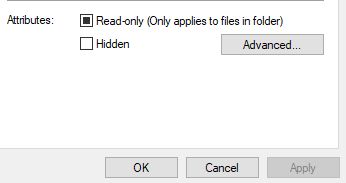
- This may be hidden. You can unhide it from your folders by right-clicking anywhere in your User folder and unselecting the Hidden check box and pressing 'Apply'
- Go into LocalLow > Pipeworks > GemsofWar
- Scroll down to the very bottom and you should be able to see your Player log and a Player-prev log

- Copy the Player log and attach to your Support ticket